
Sometimes the hardest part of any decision isn’t the options — it’s choosing between them. Whether you’re picking what to eat for dinner, choosing a student to answer a question, or running a Twitch giveaway, a spinning wheel takes the pressure off and makes the decision instant, fair, and fun.
SnapHQ’s free Spin the Wheel tool is the fastest, most feature-packed random wheel spinner online — no sign-up, no watermarks, no limits. Here’s everything you can do with it.
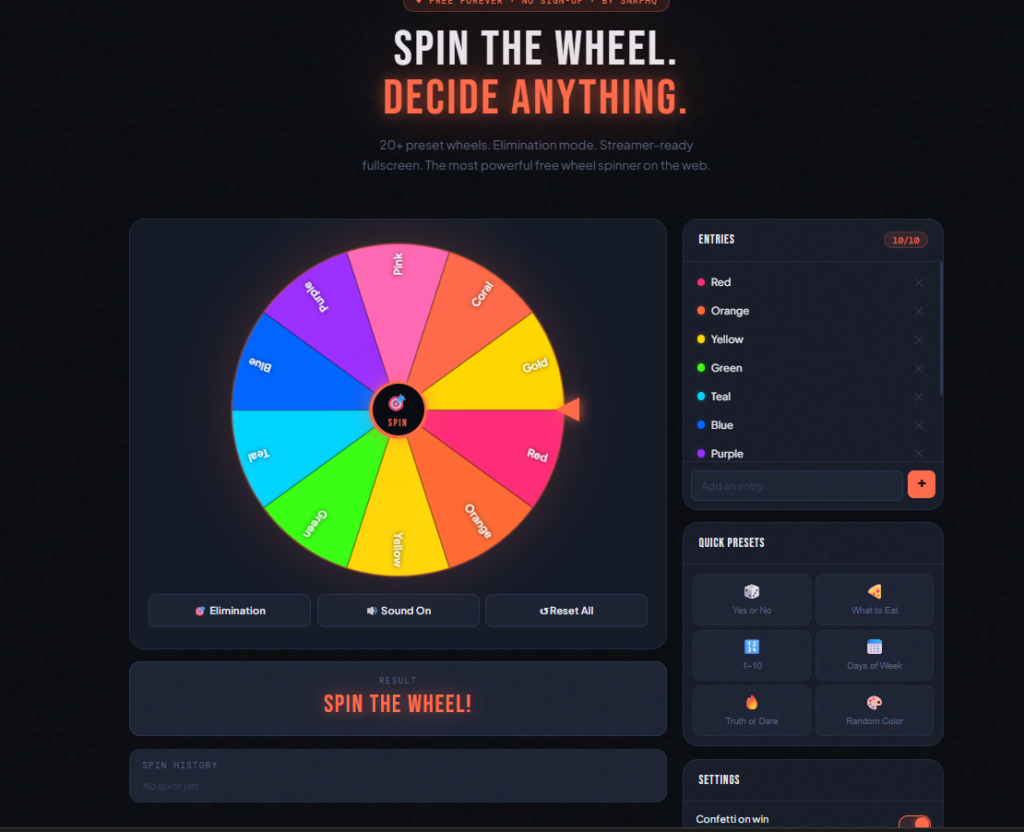
What Is a Wheel Spinner?
A wheel spinner (also called a random picker or decision wheel) is a digital version of the classic spinning wheel. You add your options as entries, spin the wheel, and it randomly lands on one of them.
It’s used by:
- Teachers picking students to answer questions without bias
- Streamers running giveaways and viewer challenges on Twitch and YouTube
- Friends deciding where to eat, what movie to watch, or who pays the bill
- Coaches randomly assigning teams or drills
- Anyone who needs a fair, fun way to make a random decision
The appeal is simple — a spinning wheel is more engaging and visually satisfying than flipping a coin or drawing names from a hat.
How to Spin the Wheel on SnapHQ
Using SnapHQ’s wheel spinner takes about 30 seconds to get started. Here’s how:
Step 1 — Open the Wheel Spinner
Go to snaphq.net/spin-the-wheel. The tool loads instantly with a default “Yes or No” wheel already set up — no account, no loading screen, no tutorial required.
Step 2 — Add Your Entries
Type your options in the entry box on the right side and click + to add them to the wheel. You can add up to 100 entries. The wheel automatically adjusts its segment sizes to fit all your entries.
Examples of what to add:
- Names of students or team members
- Food options for dinner
- Movie titles
- Punishment or reward options for a game
- Days of the week
- Any yes/no or multiple choice decision
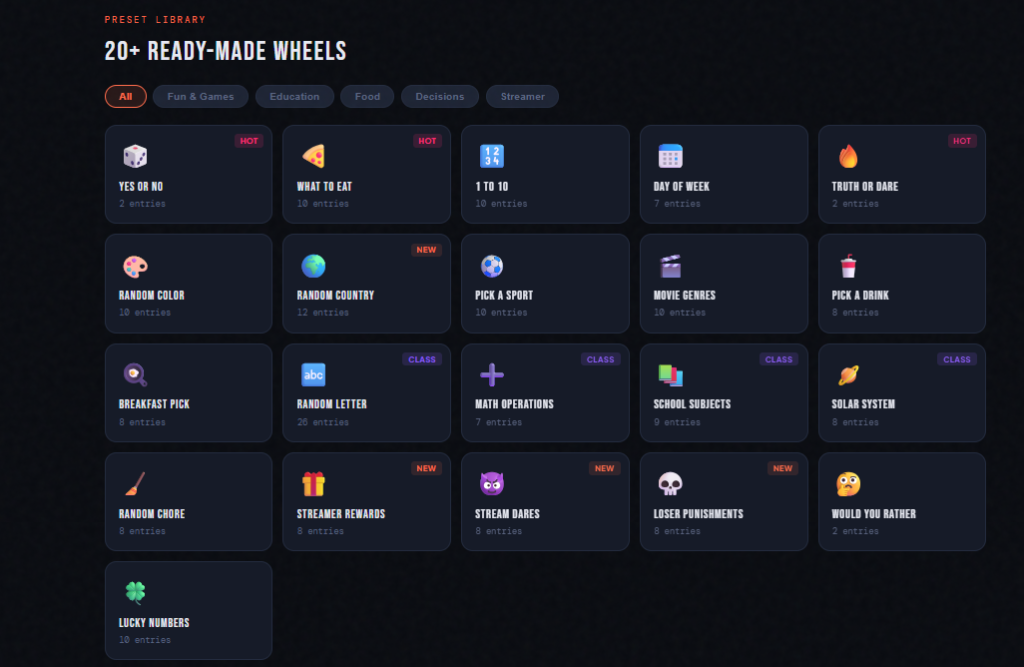
Step 3 — Or Pick a Preset Wheel
Don’t want to type everything manually? SnapHQ has 20+ preset wheels ready to load in one click:
- 🎲 Yes or No
- 🍕 What to Eat (10 food options)
- 🔢 Numbers 1–10
- 📅 Days of the Week
- 🔥 Truth or Dare
- 🎨 Random Color
- 🌍 Random Country
- 📚 School Subjects
- 🪐 Solar System
- 🎁 Streamer Rewards
- 😈 Stream Dares
- And many more…
Just click any preset and the wheel loads immediately.
Step 4 — Spin the Wheel
Click the SPIN button in the center of the wheel — or click anywhere on the wheel itself. The wheel spins with realistic physics, decelerates naturally, and lands on a random winner with a satisfying sound effect and confetti explosion.
Step 5 — Use Elimination Mode for Multiple Rounds
Turn on Elimination Mode and the winning entry is automatically removed from the wheel after each spin. Perfect for:
- Picking students one at a time until everyone has been called
- Tournament brackets
- Running multiple rounds of a competition where no one can win twice
5 Things That Make SnapHQ’s Wheel Spinner Different
There are dozens of wheel spinners online. Here’s what makes SnapHQ’s stand out:
1. Streamer Mode
Click Streamer Mode in the header and the wheel goes fullscreen on a pure black background — designed specifically to work as an OBS browser source overlay for Twitch and YouTube streamers. No distractions, no UI clutter. Just the wheel, spinning on your stream.
2. 20+ Preset Wheels
Most wheel spinners make you build every wheel from scratch. SnapHQ comes loaded with preset wheels organized by category — Fun & Games, Education, Food, Decisions, and Streamer. Load any wheel in one click.
3. Share Your Custom Wheel
Build a custom wheel and click Copy Share Link. Your entries are encoded in the URL — anyone with the link sees your exact wheel, ready to spin. No account needed on either end.
4. Sound Effects That Actually Sound Good
The wheel plays a satisfying tick sound as it spins, speeding up and slowing down with the wheel’s momentum. When it lands, a punchy multi-layered fanfare plays — not a basic beep, but a real game-show style sound effect with melody, bass, and shimmer layers.
5. Spin History
Every result is recorded in the spin history panel below the wheel. You can see exactly what came up on every previous spin in the session — useful for tracking results in classroom settings or multi-round games.
How to Use Spin the Wheel in the Classroom
Teachers are one of the biggest audiences for wheel spinners — and for good reason. A spinning wheel makes classroom participation feel fair, random, and even exciting for students.
Cold calling made fair: Add every student’s name to the wheel. Use elimination mode so each student gets called exactly once before anyone is called twice.
Random topic selection: Add your lesson topics or discussion questions to the wheel. Spin to decide what gets covered first — students often engage more when there’s an element of chance.
Group assignments: Add student names and spin to randomly assign groups. Far less drama than letting students self-select.
Quiz game shows: Use the wheel to pick which team answers next, or spin for bonus point values.
Vocabulary review: Add vocabulary words to the wheel. The student it lands on has to define or use the word in a sentence.
How Streamers Use Spin the Wheel
Spin the Wheel is one of the most popular tools among live streamers on Twitch and YouTube. Here’s how they use it:
Viewer giveaways: Copy your list of subscribers or chat participants, paste them as entries, and spin live on stream. The transparency of a spinning wheel is far more engaging than a random name generator that just spits out a winner.
Challenge wheels: Load the Stream Dares preset (or create your own) and spin to decide what challenge you have to complete next.
Punishment wheels: When you lose a game, spin the Loser Punishments wheel to see what your viewers decide. Classic content.
Game selection: Can’t decide what to play next? Build a wheel of your favorite games and let the wheel choose.
Subscriber milestones: Hit a subscriber goal? Spin a reward wheel to decide what special content you’ll create for your community.
All of this works seamlessly in SnapHQ’s streamer mode — just add it as a browser source in OBS and the wheel appears on your stream with no background, perfectly overlaid on your content.
Is the Wheel Truly Random?
Yes — and it’s important to understand why.
SnapHQ’s wheel spinner uses cryptographically random spin duration combined with a random deceleration curve. This means:
- The total spin distance is random — generated using a secure random number generator, not a predictable algorithm
- The deceleration curve varies randomly — the wheel doesn’t slow down in the same pattern every time
- Every entry always has an equal probability of winning on each spin
This is more rigorous than many “random” wheel spinners online that use JavaScript’s Math.random() — a pseudo-random function that’s technically predictable under certain conditions. SnapHQ uses the Web Crypto API for genuine randomness.
Tips for Getting the Most Out of Spin the Wheel
Keep entries concise. The wheel displays text in each segment — shorter names display better, especially when you have many entries. “Alex” works better than “Alexander Johnson” when you have 20 names on the wheel.
Use the preset library first. Before building a wheel from scratch, check the preset library — your use case might already be there. The library is organized by category so it’s quick to browse.
Share your wheel before the session. If you’re using it in a classroom or on stream, build your wheel beforehand and share the link. When it’s time to use it, just open the shared link — all your entries are already loaded.
Use elimination mode for fair selection. If you need to pick multiple people or options, always turn on elimination mode. It guarantees every entry gets picked exactly once before any repeat.
Spin history is your record. The spin history panel shows every result from the session. Screenshot it at the end if you need a record of all the results.
Frequently Asked Questions About Spin the Wheel
Is SnapHQ’s wheel spinner really free?
Yes — 100% free forever. No sign-up, no credit card, no watermarks, no limits on spins or entries. SnapHQ is ad-supported, which keeps the tools free for everyone.
How many entries can I add to the wheel?
Up to 100 entries per wheel. The wheel automatically adjusts segment sizes to fit all entries. For the best visual experience, 2–30 entries works best.
Can I use it on my phone?
Yes. SnapHQ’s wheel spinner is fully responsive and works on any smartphone or tablet. Tap the wheel or the SPIN button to spin — the touch experience works exactly like the desktop version.
Can I share my custom wheel?
Yes. Click Copy Share Link and your entries are encoded in the URL. Anyone with the link sees your exact wheel — no account needed. Great for teachers who want to prepare a wheel at home and use it on the classroom projector.
What is elimination mode?
In elimination mode, the winning entry is automatically removed from the wheel after each spin. The wheel keeps going with the remaining entries. Use it any time you want to pick through a list one by one without repeats.
How do I use it as a streamer?
Click Streamer Mode in the top right header. The wheel goes fullscreen on a black background. In OBS, add it as a browser source — the black background becomes transparent in your stream overlay.
Does the wheel have sound?
Yes. There’s a satisfying tick sound as the wheel spins, and a game-show style fanfare when it lands. Sound can be toggled on/off in the Settings panel on the right side of the tool.
Is the result truly random?
Yes. SnapHQ uses cryptographically secure randomness — the same standard used in security applications — not the predictable Math.random() that many simple wheel spinners use. Every entry has an equal probability on every spin.
Try It Right Now — Free, No Sign-Up
Whether you’re a teacher, streamer, or just someone who can’t decide what to have for dinner — SnapHQ’s wheel spinner is the fastest, fairest, most fun way to make a random pick.
No account. No download. No watermarks. Just spin.
SnapHQ is a free suite of online tools for freelancers, businesses, teachers, and everyday users. No sign-up ever. Explore all 11 tools.
